
Download SimpleOrder – restaurant inventory, catering management, real‑time analytics
Overview
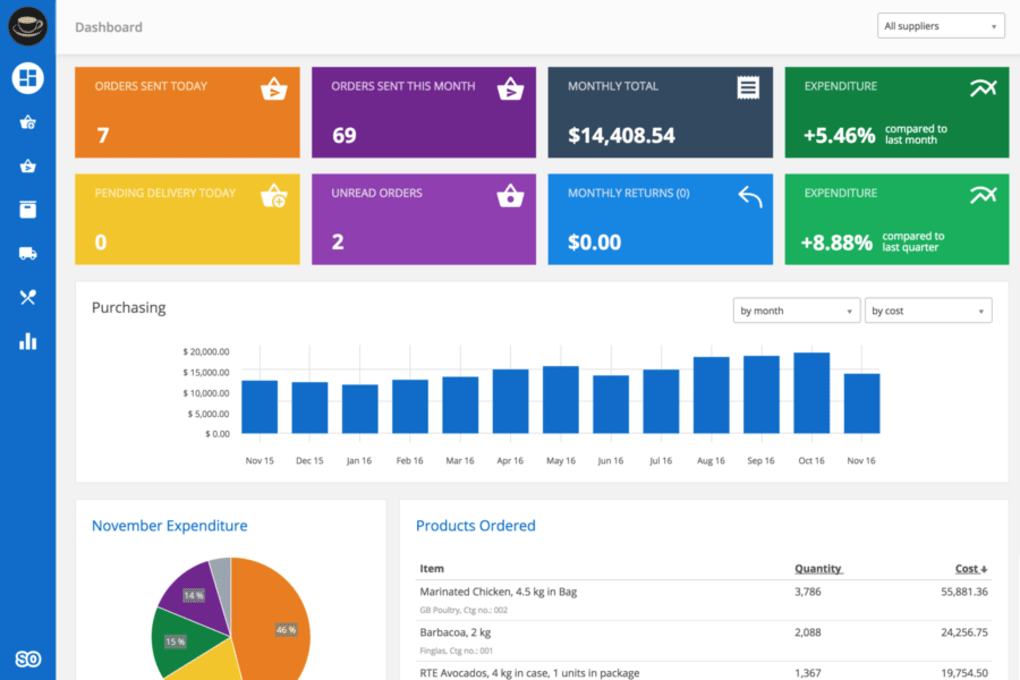
SimpleOrder is a cloud‑based catering and inventory management platform designed specifically for restaurant managers who want to bring modern software efficiency into the back‑of‑house workflow. By centralising stock levels, supplier orders, menu‑driven demand forecasts and real‑time analytics on a single dashboard, SimpleOrder eliminates the guesswork that often leads to over‑stocking, waste, or missed orders. Whether you run a single boutique bistro, a multi‑location chain, or you are a food‑service supplier looking for a reliable partner, SimpleOrder scales with your operation.
The platform’s intuitive interface works on desktop and mobile devices, enabling managers to monitor inventory, approve catering requests, and generate performance reports from anywhere—be it the kitchen, the office, or on the road. Security is built‑in with end‑to‑end encryption and role‑based access controls, so sensitive pricing and supplier data stay protected. Updates are pushed automatically through the cloud, ensuring you always have the latest features without the hassle of manual patches.
In short, SimpleOrder gives you the visibility and control needed to cut waste, improve order accuracy, and keep every customer satisfied, turning your kitchen into a well‑orchestrated, data‑driven operation.
Key Features that Streamline Catering Operations
- Real‑time inventory tracking: Automatic stock adjustments as ingredients are used or received, with colour‑coded alerts for low‑stock items.
- Dynamic catering order builder: Drag‑and‑drop menu items into client orders, auto‑calculate ingredient needs, and instantly generate prep lists.
- Supplier integration: Direct connections to major food distributors, allowing one‑click purchase orders and receipt confirmations.
- Waste reduction analytics: Detailed reports that highlight over‑stocked items, spoilage trends, and cost‑saving opportunities.
- Multi‑location support: Central dashboard for chains, with granular control over each restaurant’s inventory and order history.
- Mobile‑first design: Fully responsive UI works on iOS, Android, Windows tablets, and macOS laptops, ensuring you stay connected on the floor.
- Customisable reporting: Build KPI dashboards that track gross margin, food cost percentage, and order fulfilment rates.
- Secure role‑based access: Define user permissions for chefs, managers, accountants, and suppliers, protecting sensitive data.
- Automatic cloud backups: Daily snapshots stored in secure data centres, guaranteeing data integrity and quick disaster recovery.
- Integration with POS and accounting software: Seamless data flow to popular systems like Toast, Square, QuickBooks, and Xero.
Installation, Usage & Compatibility
Getting SimpleOrder up and running is deliberately straightforward, allowing you to focus on food rather than IT. First, visit the official SimpleOrder website and click the “Download” button that matches your operating system. For Windows users, an .exe installer guides you through a typical wizard—accept the licence, choose an installation folder, and let the software create a local shortcut. macOS users download a .dmg file, drag the SimpleOrder icon into the Applications folder, and launch the app. Mobile users simply search “SimpleOrder” in the Apple App Store or Google Play Store, tap “Install,” and log in with the credentials supplied by your administrator.
Once installed, the onboarding wizard asks you to import your existing inventory list (CSV, Excel, or direct API pull from your current POS). You’ll then define your menu items, set up supplier contacts, and configure notification preferences. The first‑time setup typically takes under an hour, and a library of video tutorials is embedded directly within the app for any step that needs clarification.
SimpleOrder is fully compatible with Windows 10/11, macOS 11+ (Big Sur and later), iOS 13+ and Android 8+ devices, ensuring cross‑platform accessibility for every member of your team.
Regular usage follows a logical flow: chefs update ingredient consumption at the end of each service, managers monitor low‑stock alerts on the dashboard, and the catering team creates client orders using the visual builder. Because all data syncs to the cloud in real time, any change made on a tablet is instantly reflected on the desktop dashboard, eliminating version conflicts and manual reconciliations.
Pros, Cons, Frequently Asked Questions & Conclusion
Pros
- Intuitive, drag‑and‑drop order builder speeds up catering quote generation.
- Real‑time inventory updates prevent stock‑outs and reduce waste.
- Multi‑location support is ideal for growing restaurant chains.
- Robust mobile apps keep managers connected on the floor.
- Secure role‑based access protects sensitive pricing and supplier data.
- Seamless integration with major POS and accounting platforms.
- Free tier available for small operations, with affordable premium plans.
Cons
- Advanced analytics require a paid subscription; the free version offers basic reports only.
- Initial data migration can be time‑consuming for restaurants with very large legacy inventories.
- Internet connectivity is required for real‑time sync; offline mode is limited to viewing cached data.
Frequently Asked Questions
Is SimpleOrder free to use?
SimpleOrder offers a free tier that includes core inventory tracking and basic catering order features. Premium plans unlock advanced analytics, multi‑location management, and deeper integrations, starting at $29 per month per location.
Can I import my existing inventory data?
Yes. SimpleOrder supports CSV, Excel, and direct API imports from most POS systems. The onboarding wizard guides you through mapping fields to ensure a smooth transition.
What devices are supported for the mobile app?
The mobile app runs on iOS 13+ (iPhone and iPad) and Android 8+ (phones and tablets). All features, including order creation and inventory updates, are fully functional on these platforms.
How does SimpleOrder protect my data?
Data is encrypted in transit (TLS 1.2) and at rest using AES‑256. Role‑based access controls ensure that each user only sees the information they need, and daily automated backups are stored in secure, geographically redundant data centres.
Is there customer support available?
Yes. SimpleOrder provides 24/7 email support, live chat during business hours, and an extensive knowledge base with video tutorials, FAQs, and community forums. Premium subscribers also receive priority phone support.
Conclusion – Take Control of Your Kitchen Today
If you’re looking for a reliable, secure, and easy‑to‑use solution to streamline catering orders, cut food waste, and gain real‑time visibility into your restaurant’s inventory, SimpleOrder delivers exactly that. Its modern cloud architecture, mobile‑first design, and deep integrations make it a future‑proof choice for both single‑unit eateries and multi‑location chains. Start with the free plan to test the core features, then upgrade as your needs grow. Download SimpleOrder now and experience a smarter, more profitable kitchen.



.png)



